The smartest kiosk app for Square businesses, built from the ground up.
Native Square. Forged in a real busy cafe. Engineered for the morning rush, the line out the door, the moment when every second matters. Get on the early-access list and be among the first businesses to install it.
Eight short emails before launch. Unsubscribe anytime. We don’t resell, share, or sell ad space against your address.
Why we built this
Forged in a real busy tourist cafe.
Cafe Meria is a seasonal cafe in Charlevoix, Michigan. House-made chai, matcha, pour-over coffee, croffles, acai bowls. Open Thursday through Sunday, mornings into early afternoon, June through August.
On a Saturday morning in peak season the line goes out the door. Tourists come in waves. Drinks are custom. Modifiers stack. The order at the register changes mid-sentence. Every minute of throughput matters, and every remake costs us double — first the time, then the trust.
Here’s what we noticed once the kiosk was on the counter: most customers drive it themselves the second they touch it. They don’t need help. They want to take their time, see the photos, pick the modifiers, type their note, and pay. For the ones who do want help, the team can still walk them through — we always offer. Both paths exist at the same time. The pace becomes elastic. The cashier can hand off to the kiosk for the regular who knows the order, and stay focused on the first-time visitor who wants a recommendation.
The result is less stress at the counter, faster throughput at peak, and warmer service for the customers who want it. The quiet wins compound: fewer remakes (because the customer typed the order themselves), happier baristas (because the rush no longer pile-drives them), longer dwell time for tourists who want to look at the menu instead of being hurried by a line.
Order June was built in production at this cafe — not in a lab, not against a fake menu, not with a market researcher. The iPad on the counter today is the iPad you’ll install on June 1. Three peak seasons of pressure. Every UX decision tested against the morning rush.
From now through Memorial Day weekend we’re refining the app every day in the cafe. Every quirk that surfaces during service gets fixed the same morning. By June 1 the app will be polished against another full season of pressure — that’s the version that ships on the App Store and Square’s App Marketplace.
That’s why the cart rail is persistent. That’s why Hot and Iced are color-coded into a segmented bar. That’s why the modifier flow is three taps and the order number lands in fifteen seconds. None of it is theoretical.
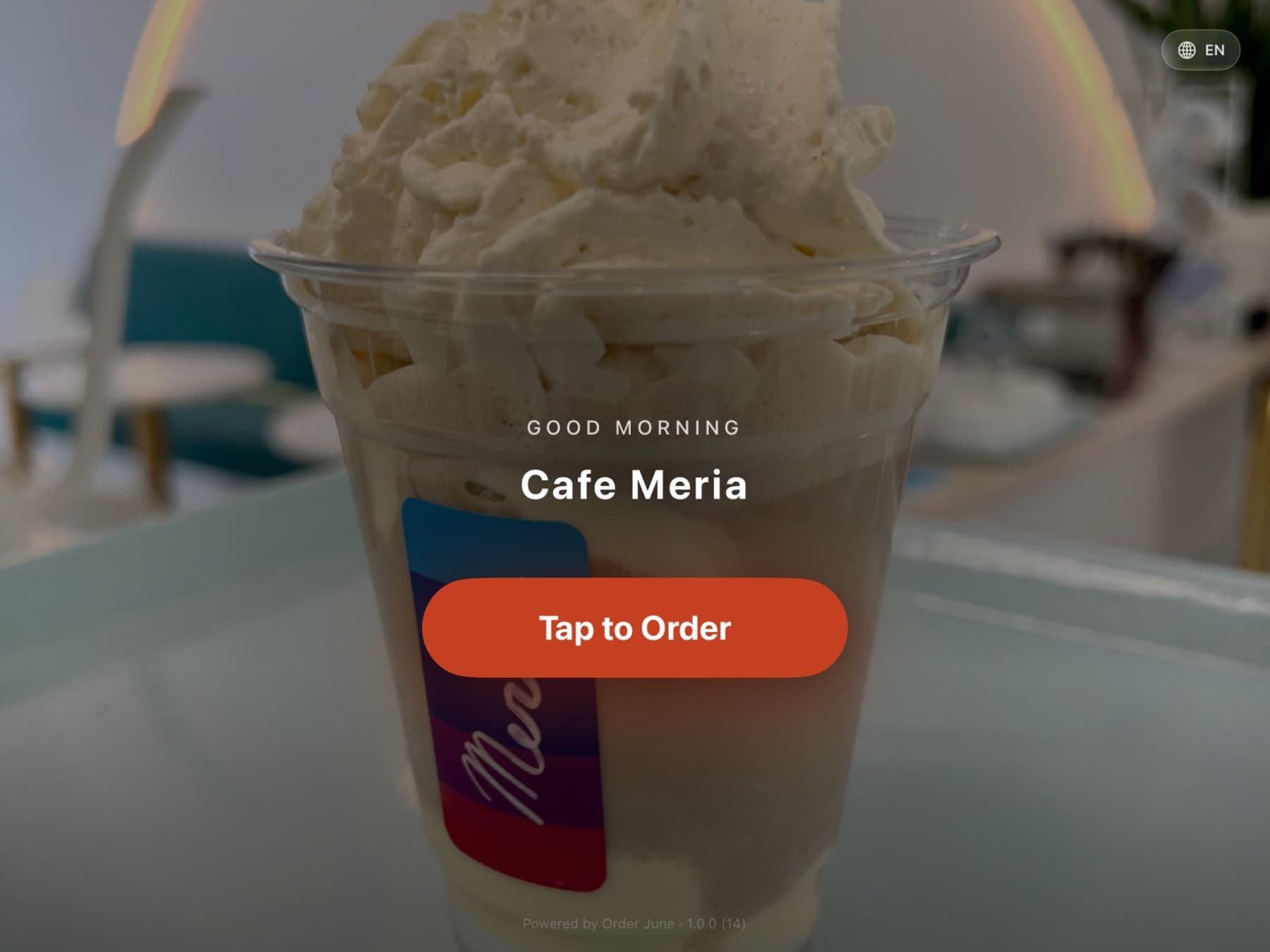
Cafe Meria · Charlevoix, Michigan · Order June live since 2024.
Six pillars
What makes Order June the smartest kiosk on Square.
Pillar 1
Built for Square, end to end.
Order June is the only kiosk app designed from the first line of code to use every Square capability natively. No translation layer, no awkward middleware, no "best effort" mapping. If Square supports it, Order June uses it. We're shipping in the Square App Marketplace alongside the Apple App Store on June 1, so installation is a single click from inside your Square dashboard.
- Catalog, Modifiers, Modifier Groups, Item Options, Item Variations
- Menus, Categories, multi-Location scoping
- Orders, Payments, Tips, Service Charges, Discounts, Taxes
- Loyalty (phone lookup, points, signup), Gift Cards (QR + GAN)
- Dining Options field on every order
- Webhooks for real-time catalog and inventory propagation
- OAuth multi-location; Vault-encrypted token storage
- Listed in the Square App Marketplace on launch day
Pillar 2
The fastest path from "I want a drink" to "Here's my card."
Built around customer psychology, not menu hierarchy. Most orders complete in four to six taps. Average modifier flow lands under five seconds.
- Persistent cart rail on the right — no page transitions to add items
- Order-level For Here / To Go toggle, single tap, always visible
- Per-item For Here / To Go override for mixed orders (the dine-in entrée plus the to-go cookie on the same ticket)
- Three-tap modifier flow with 64-pt touch targets and spring feedback
- Hot/Iced safety: color-coded segmented bar (red flame, royal-blue snowflake)
- Quantity stepper with large +/– buttons and haptic feedback
- Per-item allergy notes that print on the kitchen ticket
Pillar 3
Order accuracy approaching 100%.
When the customer enters their own order, the gap between "what they wanted" and "what got rung in" disappears. No verbal handoff, no transcription, no remakes. Remakes are the single biggest cause of rush-hour back-ups; Order June removes them at the source.
- Customer-typed special-instruction notes flow to the kitchen ticket verbatim
- Allergen tags on every item with bright, inverted callouts on the printed ticket
- Modifier groups marked required cannot be skipped (configurable per group)
- Sold-out items cross out in real time when staff 86 something in the admin
- Offline order queue with idempotency keys — Wi-Fi drops never lose orders
Pillar 4
One kiosk. Or ten. Same speed.
Atomic server-side order numbering means no collisions across iPads. Real-time sold-out propagation, broadcast pause and resume, ticket-template overrides per kiosk, kiosk identity printed on every kitchen ticket. Multi-kiosk fleets behave as one.
- Atomic order numbering via Postgres sequence RPC — never duplicates
- Per-kiosk ticket templates, modifier overrides, menu pinning
- Kiosk identity printed on every ticket ("from Pink Portable", "from Table 3")
- Broadcast commands: pause, resume, reset, banner, reader-status
- Realtime presence and last-heartbeat tracking in the web admin
- CASH badge stamped on cash-tender tickets so staff don't expect a card
Pillar 5
Customizability across every surface.
Configure once in the web admin; every kiosk updates in seconds via Realtime. The customizability you'd expect from a product designed by people who run a cafe.
- AI Photo Studio — auto-generate item photos that match your brand
- AI Menu Advisor — Claude-powered analysis of pricing and menu structure
- Ticket template builder — magnification, bold, inverted, hidden sections
- Order routing canvas — coffee to espresso bar, pastries to bake station
- Per-kiosk menu pinning (Limited vs. Full)
- Tip presets, tip disclosures, fulfillment-note labels, dining prompts — all editable
- Live kiosk mirror in the admin — preview the iPad screen from your phone
Pillar 6
Tipping that respects everyone.
Equal-size tip buttons. No dark patterns. Pre-selection at industry-respectful levels. Transparent disclosure copy. Live percentage math. Custom amounts. The lift in tip rate isn't a trick — it's a fair experience.
- Five equal-size 80-pt buttons: 15%, 18%, 20% (pre-selected), Custom, No Tip
- Live cents calculation under each button
- Merchant-configurable disclosure copy (transparent default, mute option)
- Custom mode supports $2.50 or 25% shorthand
- Modal fires after total is locked, before payment commits
- Tips route through Square's tip field — staff tip pool, correct IRS treatment
- Mandatory service charges stay separate from tips
The customer flow
Five screens. Thirty seconds. Done.
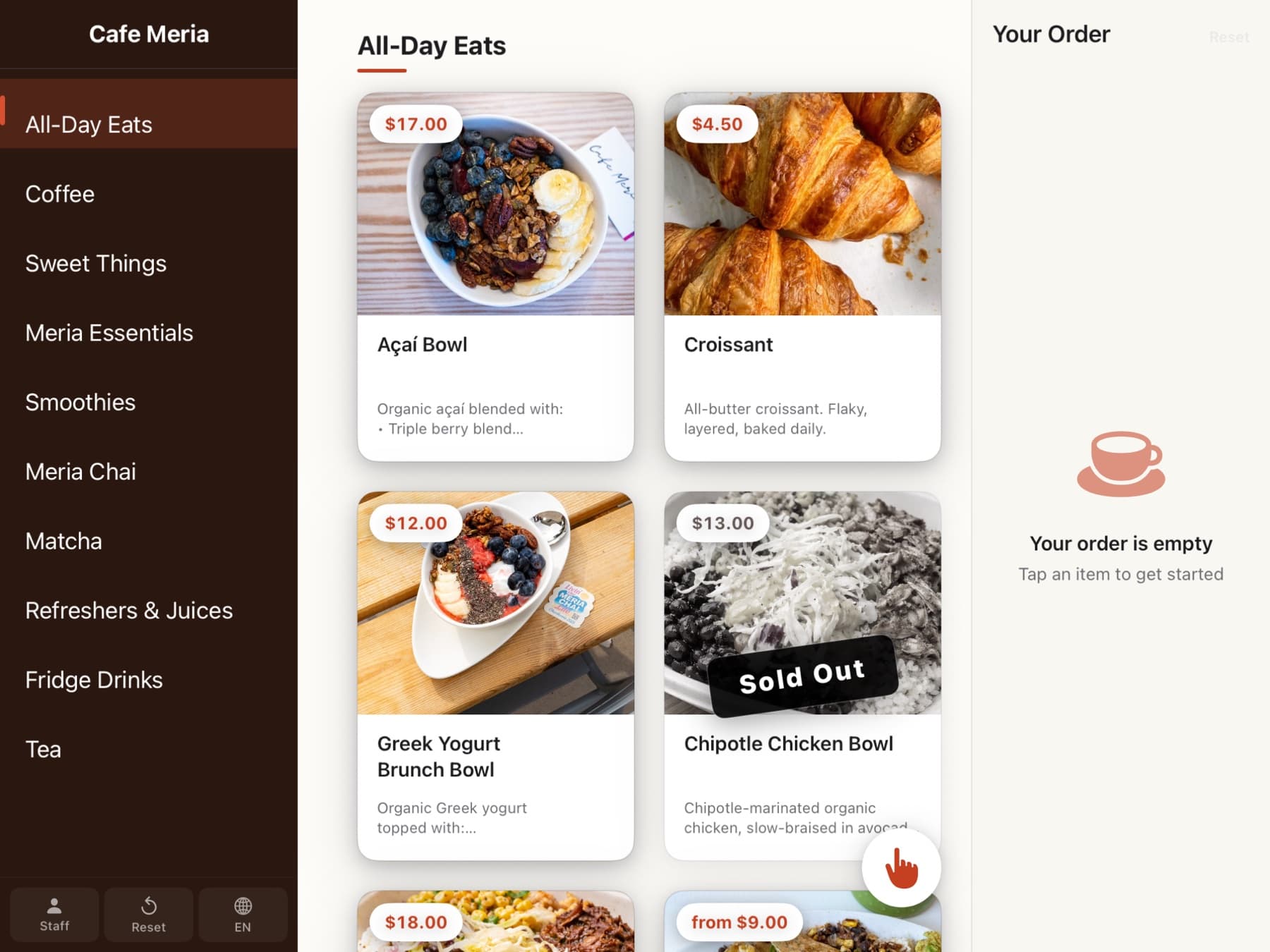
Photo-forward menu
Category sidebar or top tabs — owner picks. Sold-out items fade gently. Allergen badges show at a glance.
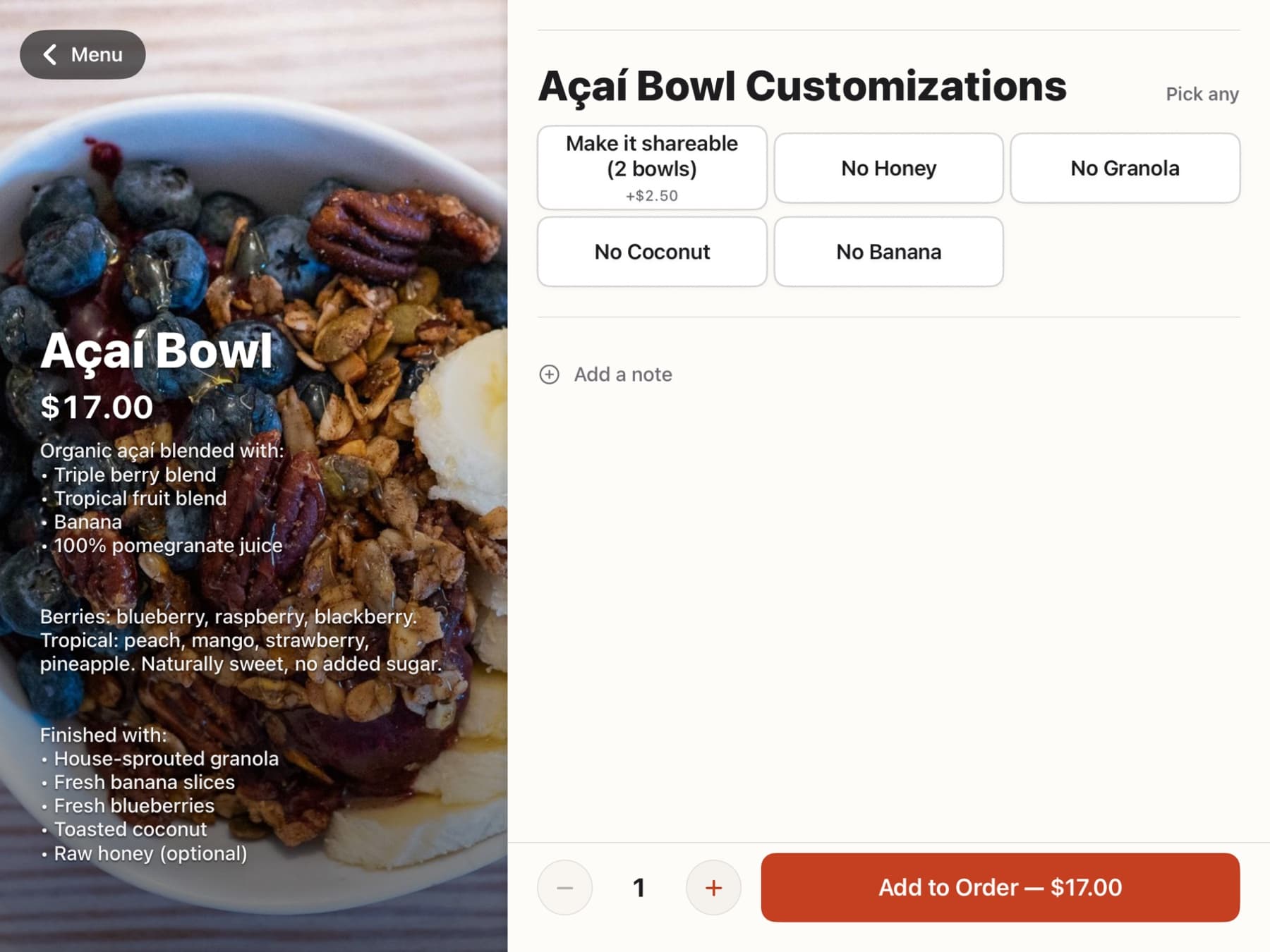
Three-tap modifier flow
Required modifiers come first. Sizes, milks, temperatures. 64-pt targets. Spring feedback. Under five seconds.
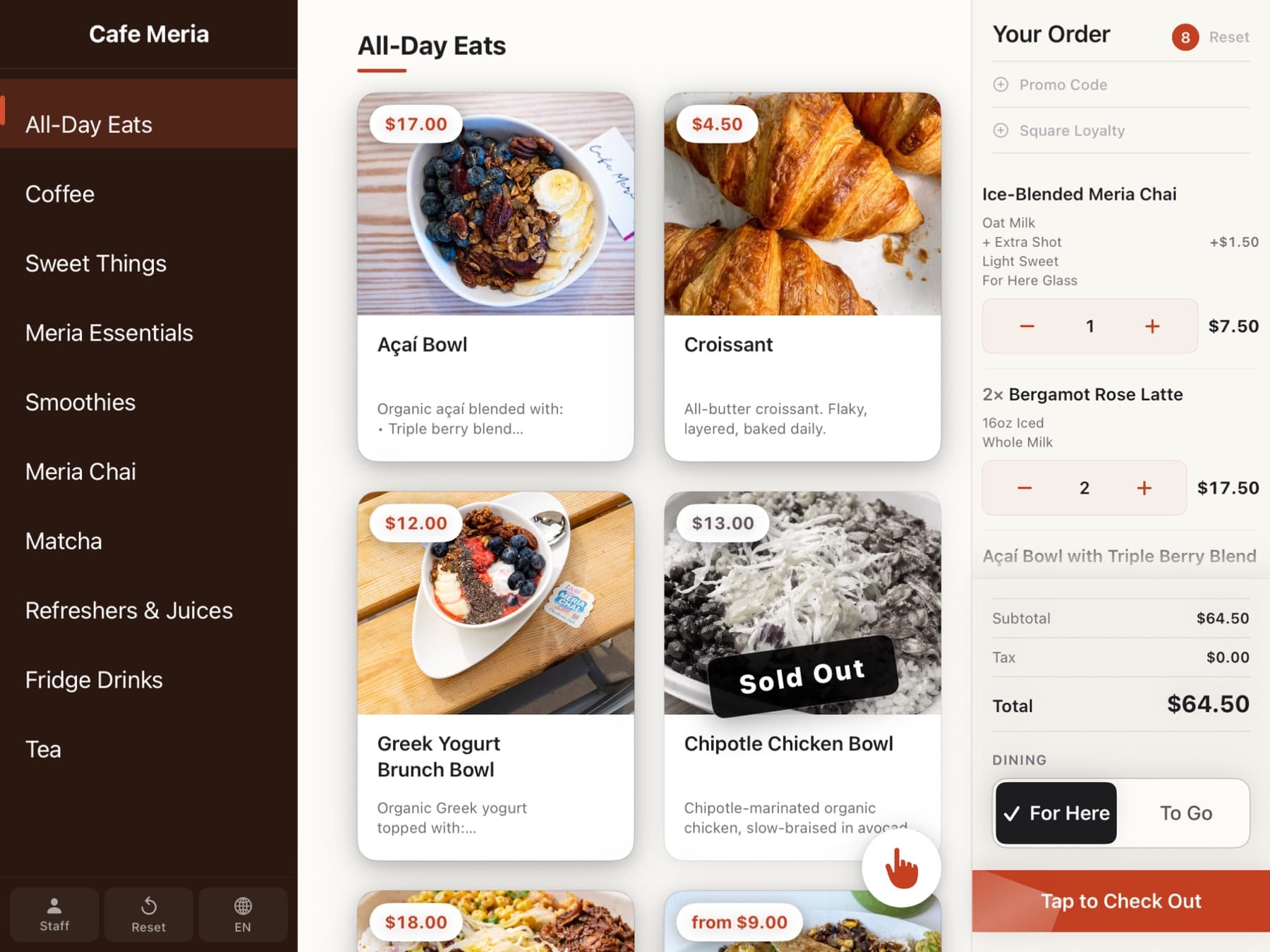
Persistent cart rail
Runs down the right side the whole time. Adjust quantities with gentle steppers. Promo codes and loyalty fit right in.
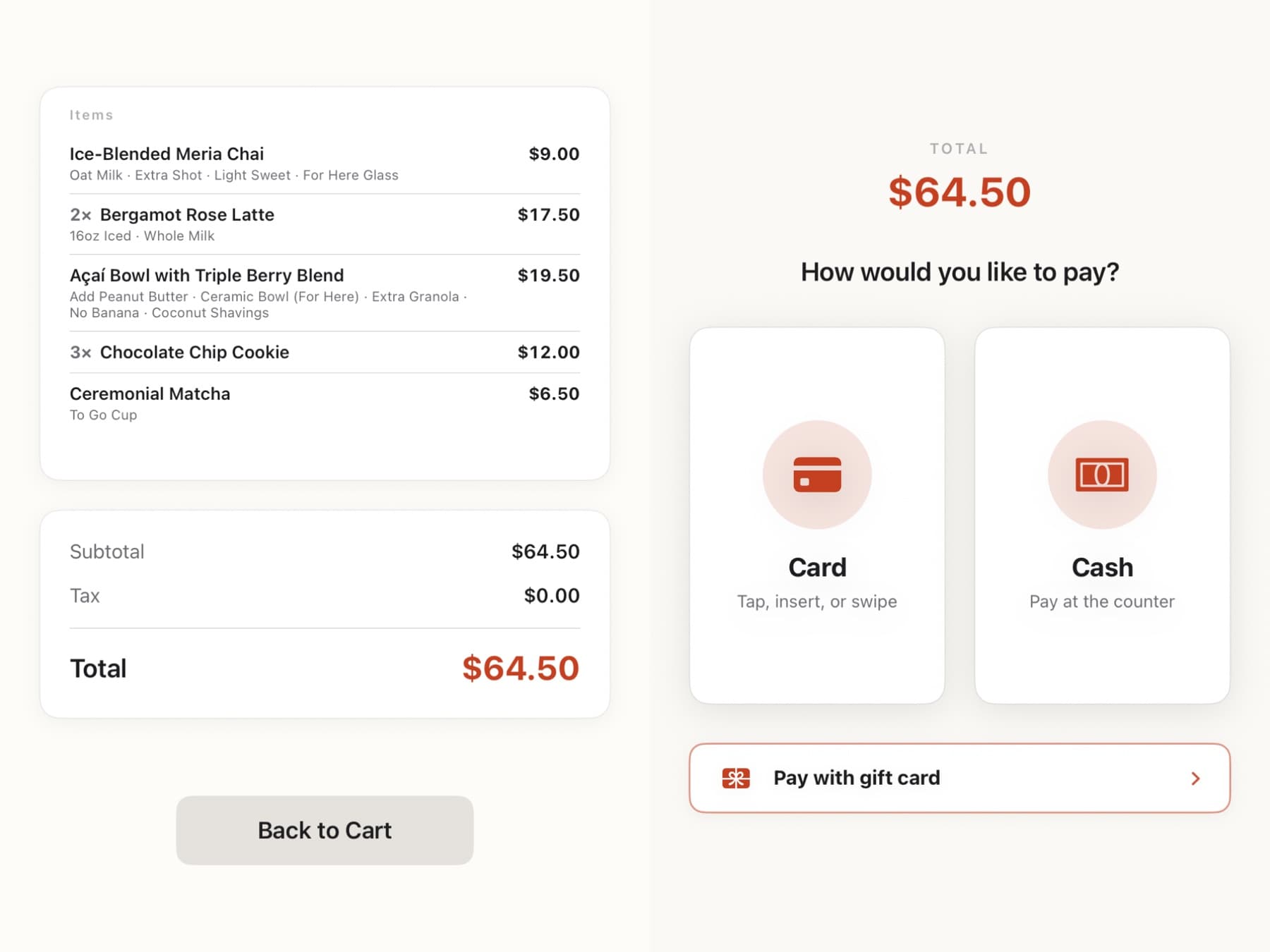
Tap-to-pay, done
Tap or insert the card. Apple Pay works. Tips route to staff. Service charges stay separate. Clean and fair.
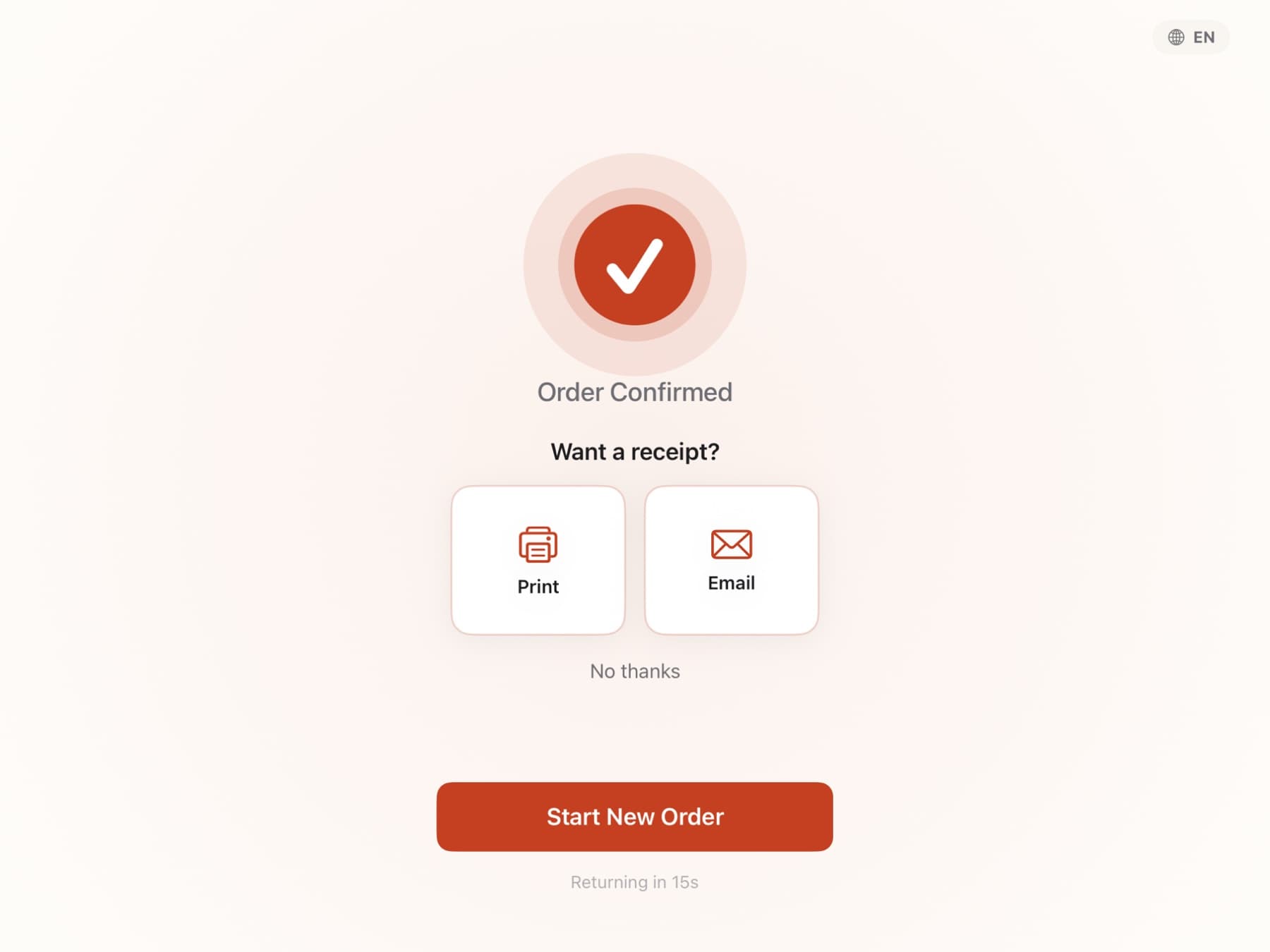
Order number lands fast
Confirmation in fifteen seconds. Receipt by email, text, or print. The attract screen is back for the next person.
The web admin
Operator-grade tools, made with taste.
The kind of admin you’d expect from Stripe Dashboard or Linear. Every surface is built for someone who has a cafe to run and three minutes to make a change before the next rush hits.
Run the room from your phone
Catalog editor, modifier manager, ticket template builder, broadcast commands, settings — every surface designed for a phone in your hand on the floor.
AI Photo Studio + Menu Advisor
Generate item photos that match your brand. Get a Claude-powered read on pricing structure and menu hierarchy whenever you ask.
Live kiosk mirror
See exactly what's on the iPad screen, in the browser, in real time. Push a settings change, see the kiosk react.
Health card on the dashboard
Mirror freshness, webhook arrivals, cron status, stale-item count. Operational signal at a glance, not buried in logs.
Ticket template builder
Magnification, bold, inverted, hidden sections, employee attribution, dining badge, payment-method stamp, kiosk-origin label. Per kiosk if you want.
Audit log for every change
Append-only record of every admin mutation. Before/after diff. Who, what, when. Compliance-grade observability.
The details
And a hundred other things no other kiosk thinks about.
Order June was built by people who use it every morning. Every screen, every ticket line, every payment moment is the result of obsessing over one customer interaction at a time.
Square gift cards, done right
Tap a QR code or type the 16-digit GAN. Partial-tender works seamlessly — apply the gift card balance, the customer covers the rest with their card or another gift card. Refunds split cleanly across both tenders. Most kiosk apps treat gift cards as an afterthought; we obsessed over the flow.
Tipping with no dark patterns
Five equal-size buttons. Live cents math under each one. Transparent disclosure copy you control. Custom mode that accepts $2.50 or 25%. Tips route through Square's tip field on the payment layer so they reach the staff tip pool with the correct IRS treatment, never bundled with revenue.
Per-item dining toggle for mixed orders
An order can be For Here OR To Go at the order level. Inside that order, individual items can be flipped — the entrée stays For Here, the cookie goes in a to-go bag. The kitchen ticket calls it out per line so the team plates correctly without thinking.
Kiosk identity printed on every ticket
Each kitchen ticket says where the order came from — "from Pink Portable", "from Counter", "from Table 3". Inverted bold so the kitchen sees it from across the room. Multi-station and food-truck setups get a free coordination layer.
CASH badge on cash-tender tickets
When a customer pays cash, the ticket prints with a CASH badge so the kitchen team doesn't sit on the order waiting for a card to clear. A tiny detail that saves a lot of confused glances during a rush.
Offline order queue with idempotency keys
When the Wi-Fi flakes, orders queue locally with idempotency keys so they sync cleanly the moment connectivity returns. No duplicates, no lost orders, no awkward "can you tell me what you wanted again?"
Order June is part of a small family of business tools we’re building at Meria. After launch, future releases will integrate music-for-business profiles so customers can scan a kiosk QR code and follow what your cafe is playing — one of several quiet pieces coming to make the in-store moment feel like the brand.
FAQ
Questions, answered honestly.
- When does Order June launch?
- June 1, 2026 on the Apple App Store and Square's App Marketplace, pending platform approvals. Everyone on the waitlist gets the launch email the moment it goes live, with a single button to install.
- Is there an Android version?
- No. Order June is iOS / iPadOS only at launch. The app runs on iPad and as a native iOS app on Apple Silicon Macs.
- What does Order June cost?
- Pricing is published at orderjune.com/pricing. Tiers scale with the number of kiosks you run. Waitlist members lock in launch pricing — we don't raise it on you later.
- Do I need a Square account?
- Yes. Order June connects to your existing Square account and uses your Square Catalog as the source of truth for menu, modifiers, item options, and dining options. Square accounts are free; sign up at squareup.com first if you don't have one.
- What hardware do I need?
- An iPad and any Square reader. Order June pairs cleanly with Square's kiosk mount and a 14-inch iPad Pro on the counter, and runs on any iPad that connects to a Square reader (Tap to Pay, contactless, or chip). It also runs as a native iOS app on Apple Silicon Macs. For specific stand and reader recommendations, Square publishes the canonical hardware list.
- Can I run more than one kiosk?
- Yes. Multi-kiosk fleets are first-class. Atomic server-side order numbering keeps tickets unique across every iPad. Broadcast pause and resume controls let you manage the whole room from your phone. Ticket templates can be customised per kiosk so every printed order tags its origin.
- Does Order June work for food trucks and quick-service?
- Yes. The order-level dining toggle, persistent cart rail, and offline order queue were built specifically for environments with intermittent Wi-Fi and high-velocity service. Order June was developed in a tourist cafe in Charlevoix that handles morning lines out the door — the patterns generalise.
- How does the tipping work?
- Equal-size tip buttons (15%, 18%, 20%, Custom, No Tip). Live cents math under each button. Transparent disclosure copy that you can configure or mute. Tips route through Square's tip field on the payment layer, so they end up in your staff tip pool with the correct IRS treatment — never bundled with revenue.
- What about loyalty and gift cards?
- Native Square Loyalty: phone-number lookup, points attached automatically, one-tap signup if the customer isn't a member yet. Native Square Gift Cards: scan a QR or type a 16-digit GAN, partial-tender works, refunds clean.
- Where is Order June running today?
- Cafe Meria, Charlevoix, Michigan. The app was developed and refined through three peak summer seasons in production at a real busy tourist cafe where Saturday mornings draw a line out the door. Most customers self-serve the second they touch the kiosk; the team helps the ones who want help. The pace becomes elastic.
- Will Order June handle my custom workflow?
- Modifiers, images, ticket templates, kiosk labels, dining prompts, tip presets, tip disclosures, fulfillment notes, menu pinning per kiosk, ticket routing — all configurable from the web admin. If your workflow has an edge, get on the waitlist and reply to a drip email with the specifics. We're tuning the pre-launch builds against real merchant constraints.
- What about data privacy and security?
- Payments go through Square — card data never touches our servers. OAuth tokens are encrypted at rest in a vault, never as plaintext columns. Every admin change writes to an append-only audit log. Multi-tenant RLS at the database layer. No ads, no data resale, ever.
- Can I get a sneak peek of the web admin?
- Yes. After you join the waitlist, reply to any email and we'll book a 15-minute walkthrough where you can drive the actual admin against a sandbox merchant. We learn from every walkthrough.
Be one of the first.
Drop your email. We’ll send eight short notes between now and launch — one per part of the product — then ping you the moment Order June hits the App Store.
Live at Cafe Meria · Charlevoix, Michigan · See pricing · Browse features